Exoscale SKS Review: Fast, Flexible, and Waiting for VPC
Exoscale SKS provisions a Kubernetes cluster in 2 minutes, has great support on a trial account, and lets you choose your CNI. The API endpoint is always public with no IP restrictions — VPC is under development. Full OpenTofu setup and fio benchmarks included.
Exoscale’s managed Kubernetes (SKS) provisioned a 3-node cluster in under 2 minutes, assigned a load balancer IP in 6 seconds, and their support answered a trial-account ticket in 6 minutes. The developer experience is genuinely excellent. The main gap: no private cluster mode and no API IP restrictions yet — both require VPC, which is under active development.
That’s the tension with Exoscale: the platform is polished and the security model is solid at the node level (short-lived credentials, self-referencing security groups, optional egress lockdown), but the networking story is waiting for VPC to close the last gap. Here’s the full breakdown.
Exoscale is a Swiss cloud provider owned by A1 Digital (A1 Telekom Austria Group), operating across 8 European zones in Switzerland, Germany, Austria, Bulgaria, and Croatia. Think of them as the European alternative that actually feels modern, not like a rebadged OpenStack console.
What I Tested
- Control Plane: Starter tier (free, no SLA)
- Nodes: 3x Standard Medium (2 vCPU, 4 GB RAM, 50 GB disk)
- Region: DE-FRA-1 (Frankfurt, Germany)
- Kubernetes Version: 1.35.0
- CNI: Cilium
- Addons: Exoscale Cloud Controller, Container Storage Interface, Metrics Server
- Automation: OpenTofu with the official Exoscale provider
Total estimated cost: ~€91.53/month (3x €30.51/node). Control plane is free on the Starter tier. The Pro tier adds €30.44/month for SLA and dedicated support.
I tested on a trial account with €150 free credit, courtesy of a friendly Redditor who shared a promo code. That’s enough for several weeks of running a 3-node cluster.
The cluster runs ArgoCD for GitOps with an app-of-apps pattern, all provisioned through a single OpenTofu repo.
The Good
Fast Cluster Provisioning
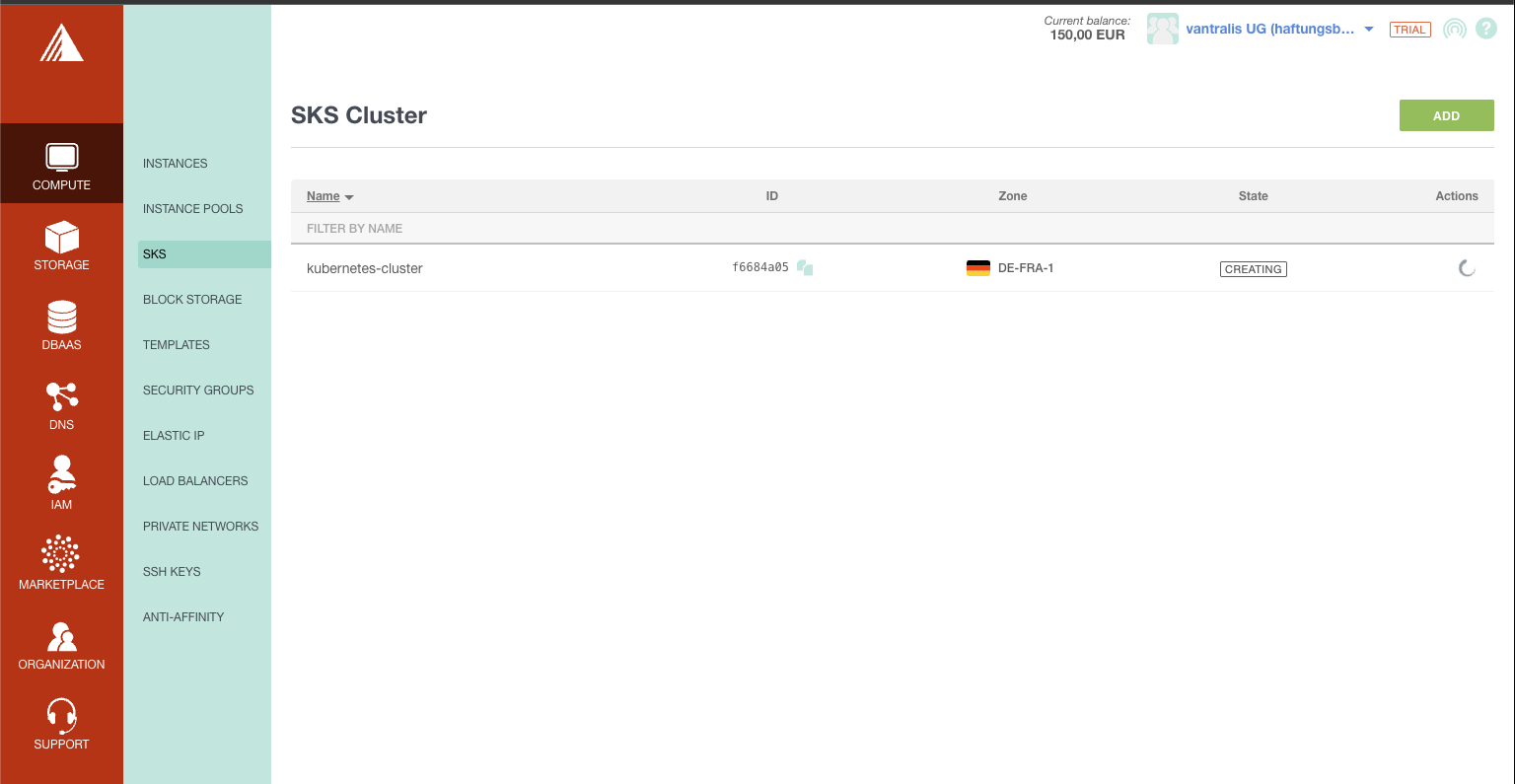
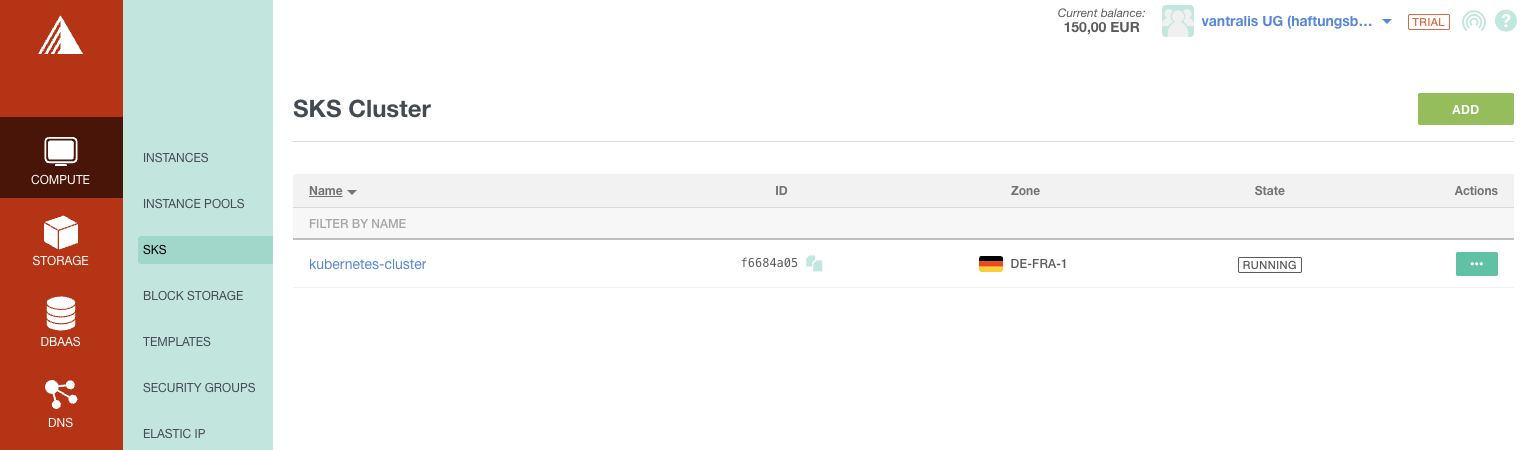
The SKS cluster went from CREATING to RUNNING in under 2 minutes. I’ve tested OVHcloud (also fast), Infomaniak (where nodes sometimes wouldn’t come up at all), and Hetzner + Talos (fast but DIY). Exoscale was the fastest managed offering.
Clean Console and Cluster Management
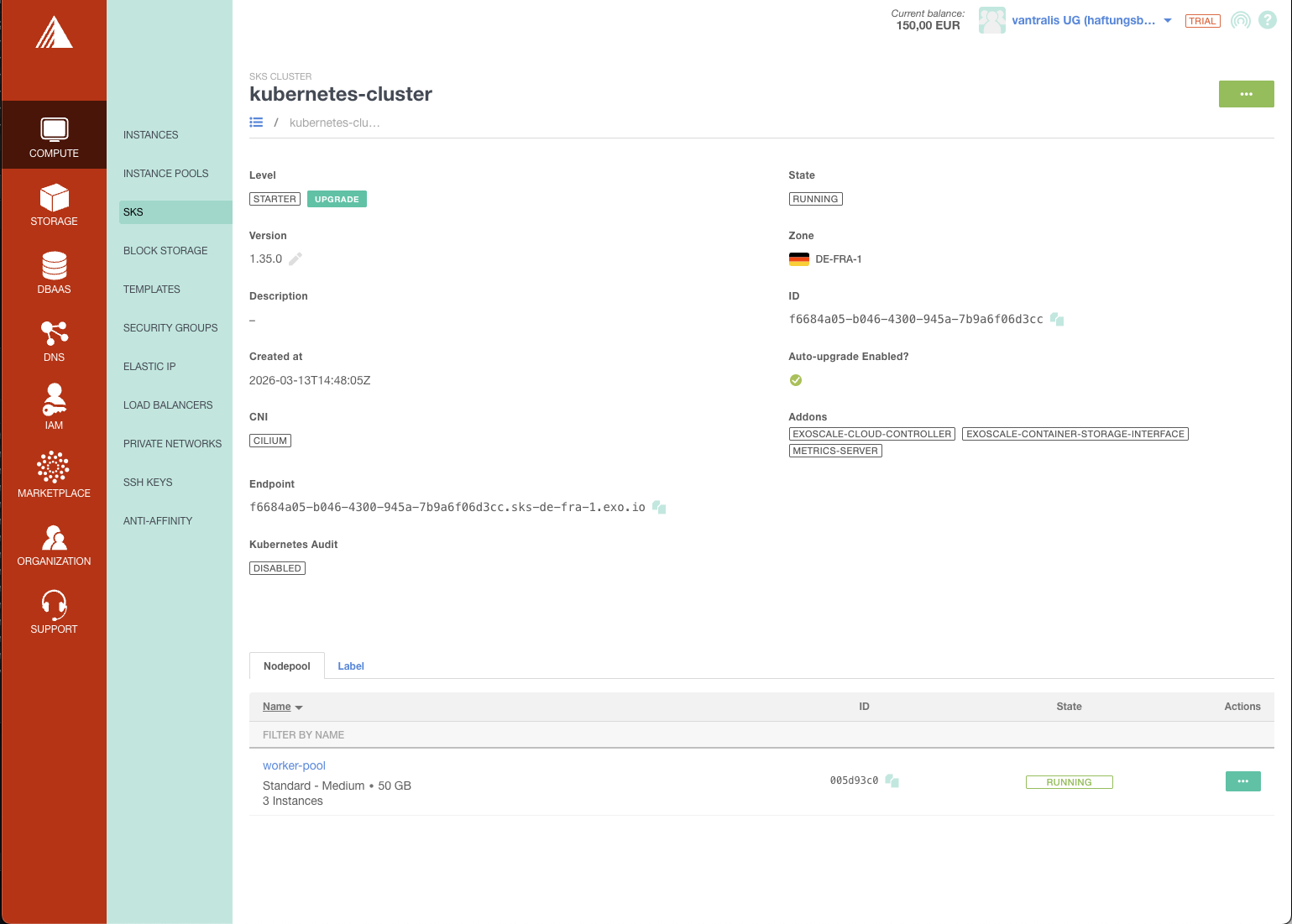
The cluster detail page shows everything at a glance: version, zone, CNI, addons, endpoint, and node pool status. No clicking through five tabs to find basic information.
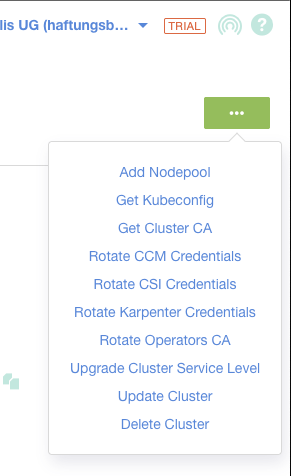
The actions menu gives you quick access to kubeconfig download, credential rotation, and cluster management - all in one place.
You Choose Your CNI
Unlike OVHcloud and Infomaniak where the CNI is decided for you, Exoscale lets you choose between Cilium, Calico, or no CNI at all at cluster creation time. I went with Cilium for its eBPF-based networking, but having the option is valuable if your team has existing Calico expertise, specific NetworkPolicy requirements, or wants to bring their own CNI plugin entirely.
The trade-off: your security group rules must match the CNI you choose. Cilium needs ports 8472 (VXLAN), 4240 (health), and ICMP. Calico needs port 4789 (VXLAN). Get it wrong and your pods can’t communicate.
Anti-Affinity Groups for HA
Exoscale supports anti-affinity groups as a first-class resource. This spreads your worker nodes across different physical hypervisors, so a single hardware failure doesn’t take out all your nodes at once.
resource "exoscale_anti_affinity_group" "workers" {
  name        = "${var.cluster_name}-workers"
  description = "Anti-affinity for ${var.cluster_name} worker nodes"
}

resource "exoscale_sks_nodepool" "workers" {
  # ...
  anti_affinity_group_ids = [exoscale_anti_affinity_group.workers.id]
}
This is free and has no downside. Neither OVHcloud nor Infomaniak expose this as a configurable option. It’s a small thing, but it shows Exoscale thinks about operational concerns.
Surprisingly Good Support
I opened a ticket about storage classes on a trial account and got a knowledgeable response from Benoit at Exoscale support in 6 minutes.
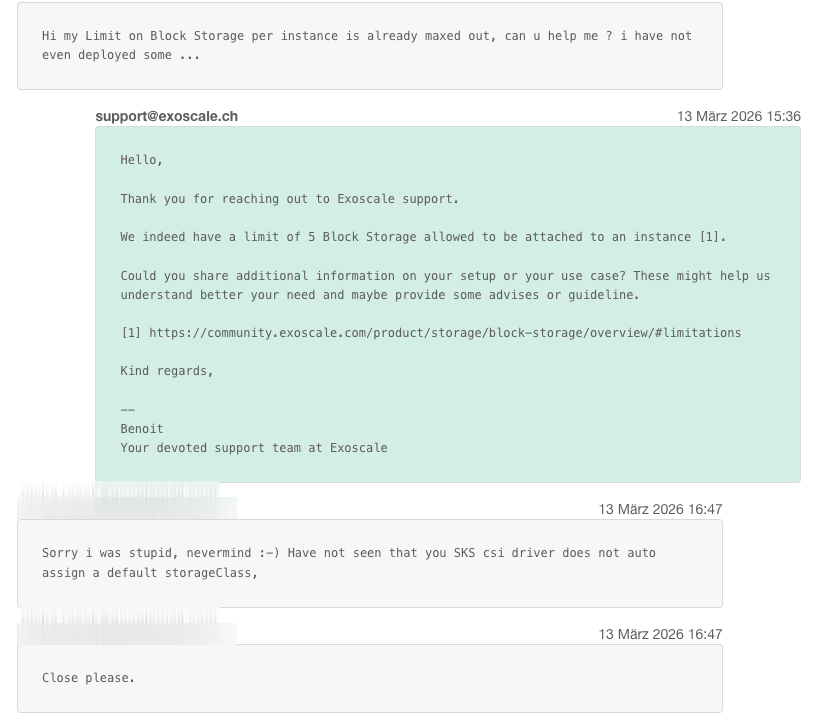
Six minutes. On a trial account. Most providers make you wait days, if they respond at all.
DBaaS Built In
Exoscale offers managed databases (DBaaS) directly in their console - PostgreSQL, MySQL, Redis, Kafka, OpenSearch, and Grafana. That’s a clear advantage over Infomaniak (MySQL only). Having managed PostgreSQL alongside your Kubernetes cluster means one fewer vendor and one fewer billing relationship.
Six GPU Families Up to 288 vCPU
Exoscale offers GPU 2, GPU 3, A30, 3080 Ti, A5000, and RTX 6000 PRO as node pool instance types. The RTX 6000 PRO goes up to 288 vCPUs and 960 GB RAM.
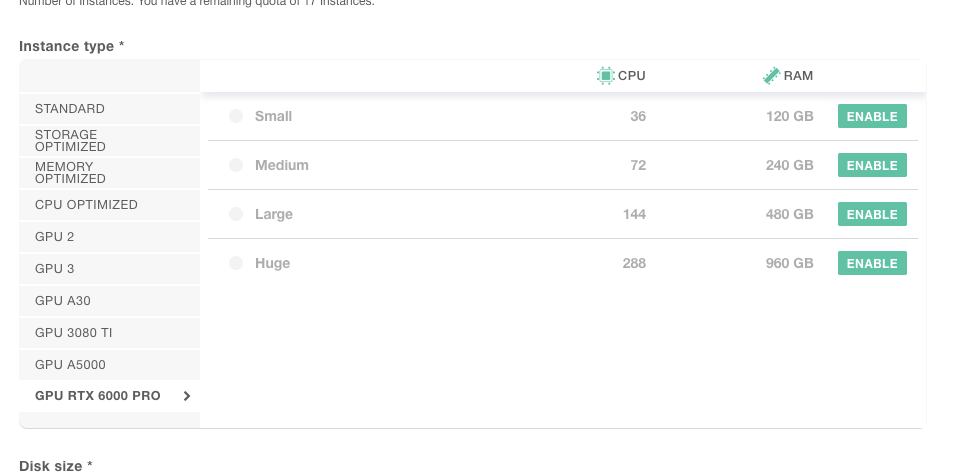
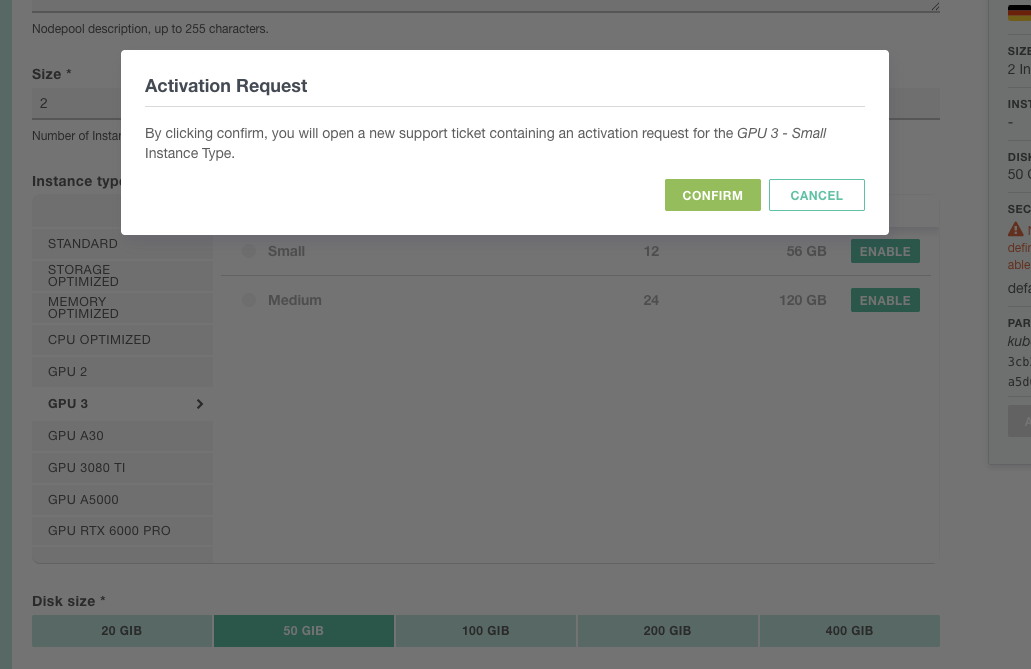
GPU instances require an activation request (support ticket), which makes sense for capacity planning.
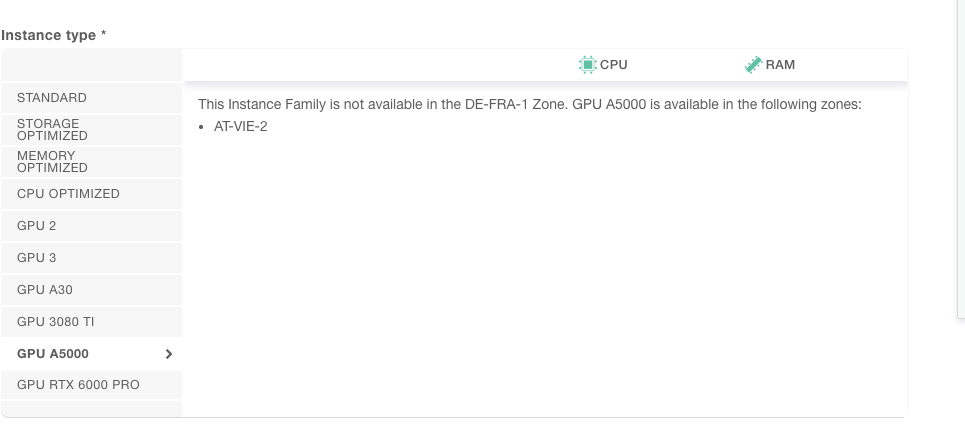
Zone availability varies - the A5000, for example, is only available in AT-VIE-2 (Vienna), not in Frankfurt.
See our GPU cloud instances audit for a full comparison across providers.
Eight Zones Across Five Countries
| Zone | Location |
|---|---|
ch-gva-2 | Geneva, Switzerland |
ch-dk-2 | Zurich, Switzerland |
de-fra-1 | Frankfurt, Germany |
de-muc-1 | Munich, Germany |
at-vie-1 | Vienna, Austria |
at-vie-2 | Vienna, Austria (2nd) |
bg-sof-1 | Sofia, Bulgaria |
hr-zag-1 | Zagreb, Croatia |
Useful for latency-sensitive deployments or data residency requirements across the DACH region and Southeastern Europe. Infomaniak has 1 zone. OVHcloud has broader coverage (10+ including France and Poland) but no presence in Austria, Bulgaria, or Croatia.
Load Balancer Provisioning in Seconds
Deploying Traefik as a LoadBalancer service triggered Exoscale’s Cloud Controller Manager, and a public IP was assigned within seconds. The events tell the story: EnsuredLoadBalancer at 6 seconds.
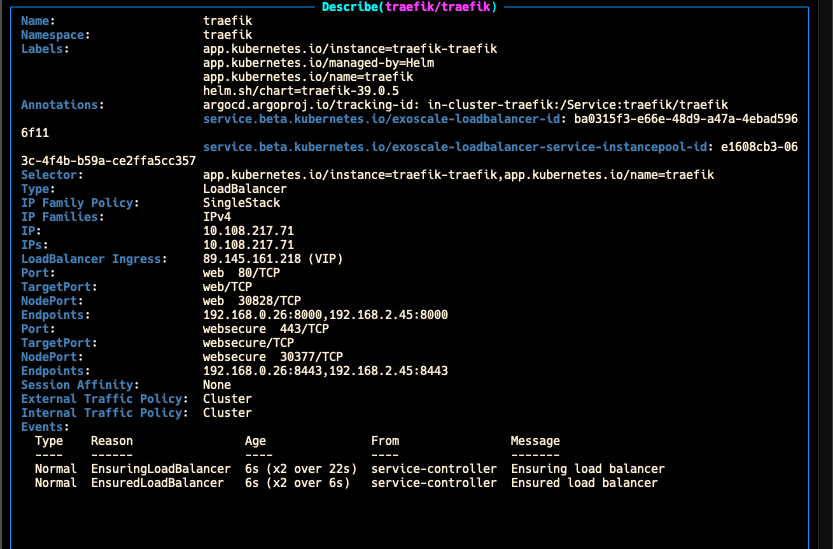
No manual configuration, no waiting. Traefik was deployed via ArgoCD (Helm chart v39.0.5), and the CCM handled the rest. OVHcloud’s Octavia load balancer took a few minutes to provision in my test. Exoscale did it in 6 seconds.
Readable Instance Type Naming
A small but appreciated detail: Exoscale uses standard.medium, standard.large, memory.huge instead of OVHcloud’s cryptic d2-8 or Infomaniak’s a4-ram8-disk80-perf1. You can actually read the instance type and know what you’re getting.
The Not-So-Good
No Private Clusters, No API Restrictions, No Network Isolation
This is the biggest limitation. The Kubernetes API endpoint on Exoscale SKS is always public. There is no private cluster mode, no API IP allowlisting, and no field in the API, CLI, console, or Terraform provider to restrict access. I verified this against the Exoscale API v2 schema, Terraform provider docs, and community documentation. This is a confirmed platform limitation, not a missing feature in my config.
Unlike OVHcloud’s IP restrictions (which let you lock the API to specific CIDRs) or hyperscalers’ private endpoints, anyone who obtains your kubeconfig can reach your API server from anywhere in the world. This isn’t just a compliance concern: a publicly reachable API endpoint means a leaked credential (a kubeconfig in a CI log, a developer’s laptop compromise, a misconfigured Git repo) could provide access to the cluster from anywhere. With a private endpoint or IP allowlist, leaked credentials have limited impact since they can’t be used from outside the network.
And the private networking story doesn’t help either. Exoscale private networks are pure Layer 2 - essentially a virtual switch. No routing, no NAT, no internet gateway. Attaching one to a node pool only adds an extra NIC; it doesn’t replace the public interface. The details:
- The CNI overlay (Cilium/Calico) runs over the public interface, not the private network
- Security groups don’t apply to private network traffic - it’s completely unfiltered
- The API has
public-ip-assignment: nonebut it’s not exposed in the Terraform provider (v0.68.0) - Without public IPs, nodes can’t pull images or reach the Exoscale API unless you build a NAT gateway VM yourself
The compensating controls are meaningful: short-lived kubeconfig certificates (configurable TTL, default 30 days), scoped credentials with per-user/group bindings, CA rotation for emergency credential revocation, OIDC integration, RBAC, audit logging, and an optional egress lockdown policy. That’s real defense-in-depth, though it’s not a substitute for network isolation in strict compliance environments.
According to Exoscale, SKS was independently audited by Synacktiv in December 2024, with no critical or high-severity findings. Private API endpoints, CIDR restrictions, and private clusters all require VPC, which is under active development. CIDR restriction is on the 2026 roadmap, but there’s no firm ETA on VPC availability yet.
No Default StorageClass
Exoscale CSI creates two StorageClasses but neither is set as default:
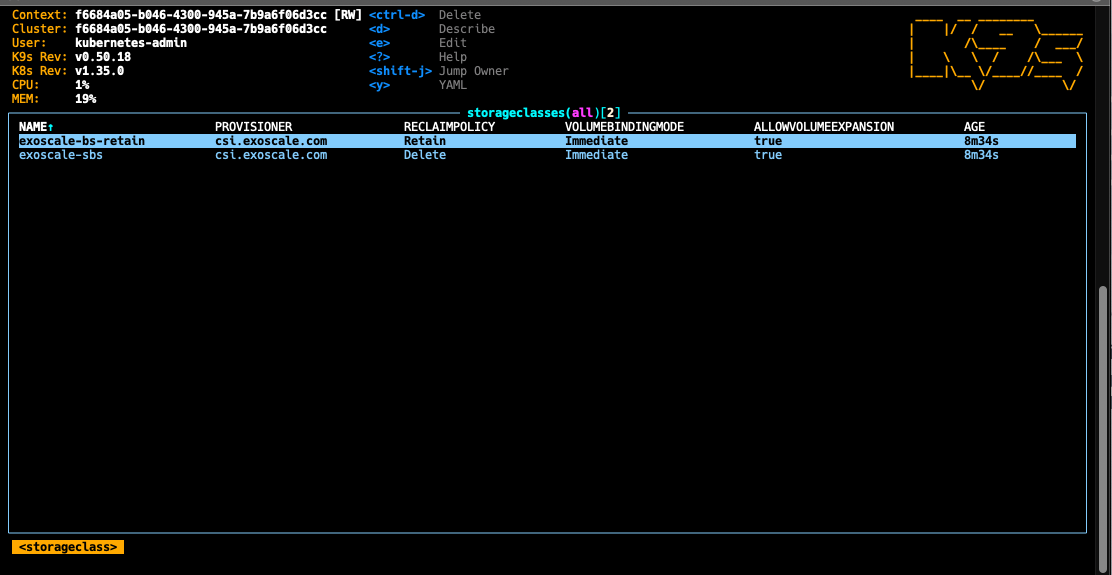
| Storage Class | Reclaim Policy | Default? |
|---|---|---|
exoscale-bs-retain | Retain | No |
exoscale-sbs | Delete | No |
Many Helm charts (CNPG, Vault, Keycloak) expect a default StorageClass to exist. If you’re using GitOps, the right fix is to set the default in your cluster-essentials repo - either as a Kustomize patch or a Helm values override that references exoscale-sbs as the storageClassName. That way it’s declarative and survives cluster recreation.
As a quick fix for manual testing:
kubectl patch storageclass exoscale-sbs \
  -p '{"metadata":{"annotations":{"storageclass.kubernetes.io/is-default-class":"true"}}}'
I actually opened a support ticket about this thinking something was broken before realizing it’s by design. If you’re deploying charts that default to an empty storageClassName, you’ll hit this on day one.
No RWX Volumes
All Exoscale storage classes are ReadWriteOnce (RWO) only. Block storage is RWO by nature — but that’s not the point. The gap is the absence of a managed RWX solution alongside it. AWS has EFS, Azure has Azure Files, and even OVHcloud is actively communicating a managed RWX offering on their roadmap. On-prem this is a solved problem for decades.
If you need volumes mounted by multiple pods simultaneously (ReadWriteMany / RWX), you have three self-managed options:
- Longhorn - Install Longhorn in your cluster. It discovers node disks, distributes and replicates volumes, and supports RWX via NFS. Also handles snapshots and backups to Exoscale SOS (S3-compatible). This is probably the best self-managed option.
- NFS server on block storage - Run your own NFS server on top of a block storage volume. Works but adds operational overhead.
- Object Storage via Mountpoint - Use Exoscale SOS with AWS Mountpoint for S3 as a Kubernetes volume. Good for read-heavy workloads, not suitable for high-IOPS.
Exoscale mentions that a managed RWX service is “in our roadmap” - but that blog post is from March 2025 and there’s been no update since. Don’t count on it. Plan your storage architecture accordingly before deploying stateful workloads.
Block Storage Performance: The Benchmark Truth
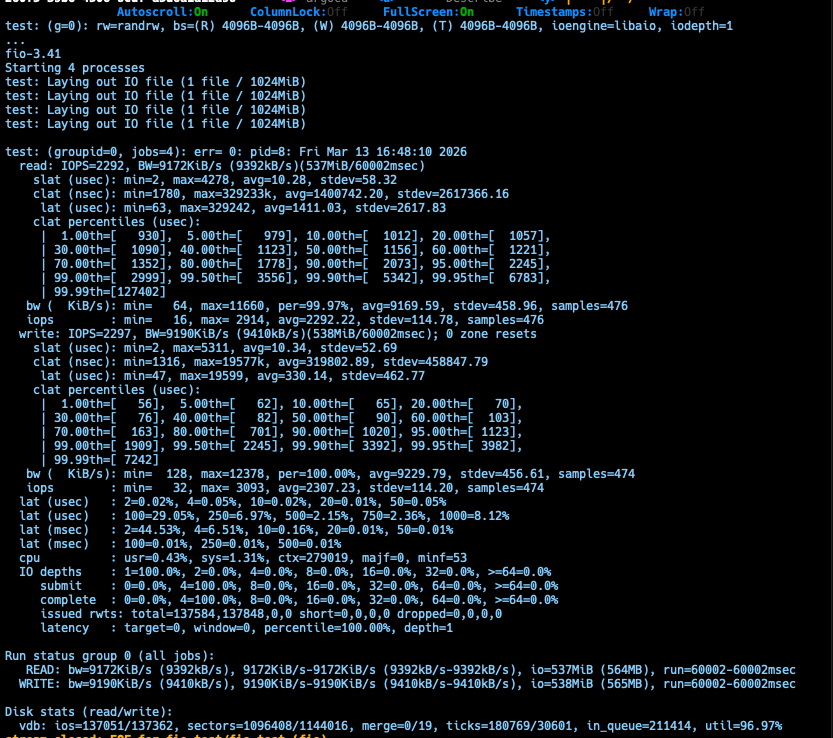
I ran fio (3.41, iodepth=32, numjobs=4, 3 independent runs) against Exoscale’s block storage. Exoscale advertises 5,000 IOPS per volume - here’s what I actually measured:
| Test | Advertised | Measured (realistic) | Notes |
|---|---|---|---|
| Random 4K RW IOPS | 5,000 | ~3,800-4,000 combined | 5,000 is a burst ceiling, not sustained |
| Sequential Read | n/a | ~515 MB/s | Stable across all runs, competitive |
| Sequential Write | n/a | 773-843 MB/s (headline) | Write cache inflated - min/max spread of 10-3,952 MB/s |
| Write p99.99 latency | n/a | 2.4-2.6 seconds | Reproducible across all runs |
| Read p99.99 latency | n/a | 860 ms - 1 s | Random RW |
The write tail latency is the real story. The p50 at 3.7 ms looks great, but 0.01% of writes stall for 2.5+ seconds. That’s not an anomaly - it reproduced across every run. The sequential write bandwidth is also misleading: the min/max spread exposes burst-then-drain cache behaviour.
For comparison, Infomaniak caps at 500-1,000 IOPS - Exoscale is roughly 4-8x faster for random I/O. But for write-heavy database workloads, the p99.99 tail latency means you should use Exoscale’s own Managed Database Service instead. General web apps, stateless-ish Kubernetes PVCs, and backup workloads will be fine.
Short-Lived Kubeconfig
The kubeconfig is generated as a separate resource with a configurable certificate TTL. The default is 30 days, but the ttl_seconds lets you set any duration:
resource "exoscale_sks_kubeconfig" "admin" {
  cluster_id  = exoscale_sks_cluster.cluster.id
  zone        = exoscale_sks_cluster.cluster.zone
  user        = "kubernetes-admin"
  groups      = ["system:masters"]
  ttl_seconds = 2592000  # 30 days (default, configurable)
}
This is a genuine security differentiator over OVHcloud and Infomaniak’s long-lived tokens:
- Scoped credentials: Each kubeconfig can be issued with specific
userandgroupbindings — generate separate credentials per team, per CI pipeline, or per environment instead of one admin kubeconfig for everything. - CA rotation:
exo compute sks rotate-operators-caimmediately invalidates all previously issued kubeconfigs. This is an emergency kill switch if credentials leak — something long-lived tokens on other providers don’t offer. - Time-bound by design: Aligns with industry best practices for credential management.
For CI/CD pipelines, the standard Kubernetes practice is to use service account tokens rather than kubeconfig certificates.
The Setup: OpenTofu From Scratch
I’ve published the complete OpenTofu setup on GitHub. Here are the key parts.
IAM and API Keys
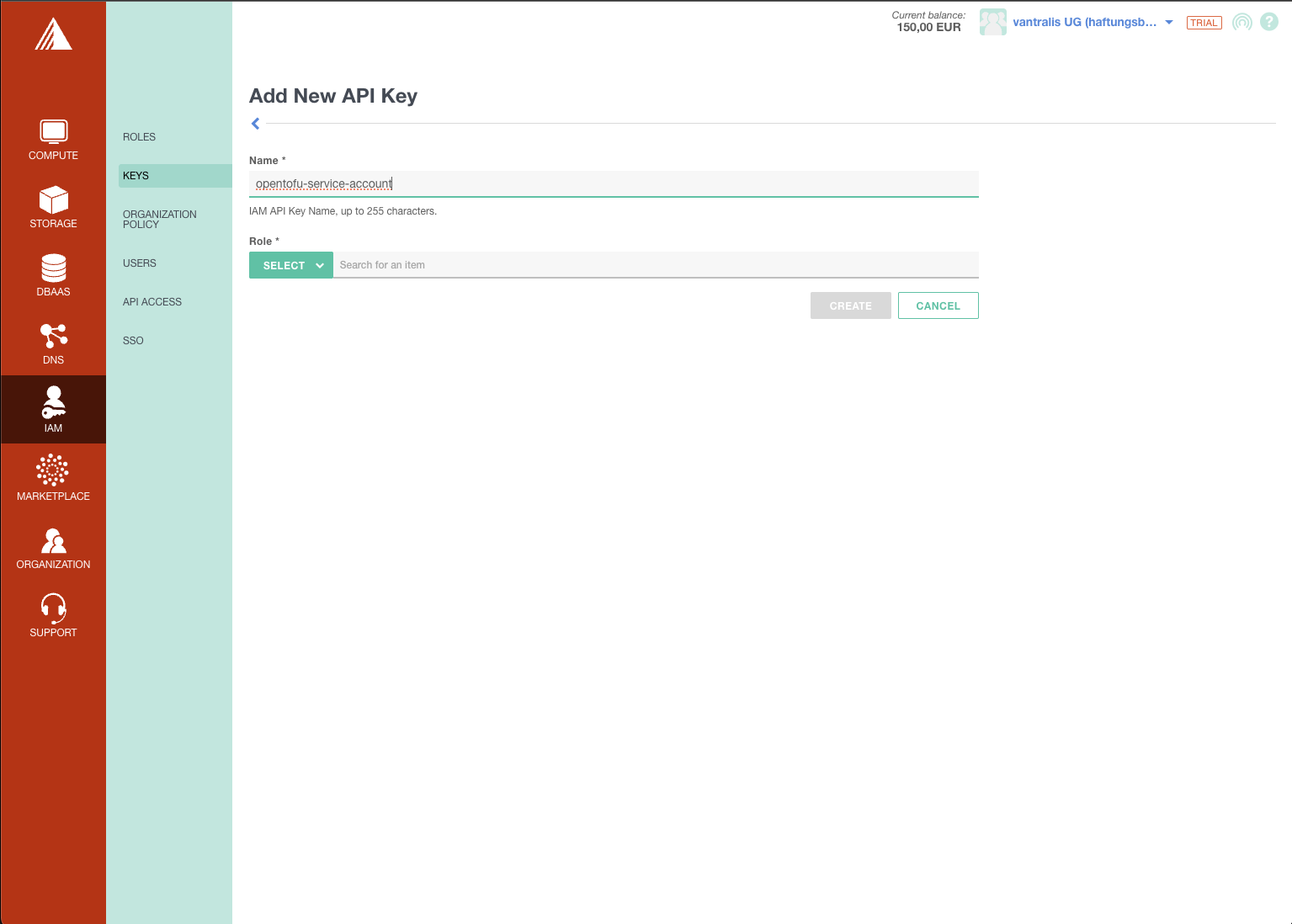
First, create an API key in the Exoscale console under IAM > Keys. I created a dedicated opentofu-service-account key:
Provider Configuration
The Exoscale provider is minimal. The Helm provider connects through the kubeconfig by parsing the YAML directly:
terraform {
  required_version = ">= 1.6.0"

  required_providers {
    exoscale = {
      source  = "exoscale/exoscale"
      version = "~> 0.68.0"
    }
    helm = {
      source  = "hashicorp/helm"
      version = "~> 3.1.0"
    }
  }
}

provider "exoscale" {
  key    = var.exoscale_api_key
  secret = var.exoscale_api_secret
}

provider "helm" {
  kubernetes = {
    host                   = yamldecode(exoscale_sks_kubeconfig.admin.kubeconfig)["clusters"][0]["cluster"]["server"]
    cluster_ca_certificate = base64decode(yamldecode(exoscale_sks_kubeconfig.admin.kubeconfig)["clusters"][0]["cluster"]["certificate-authority-data"])
    client_certificate     = base64decode(yamldecode(exoscale_sks_kubeconfig.admin.kubeconfig)["users"][0]["user"]["client-certificate-data"])
    client_key             = base64decode(yamldecode(exoscale_sks_kubeconfig.admin.kubeconfig)["users"][0]["user"]["client-key-data"])
  }
}
The kubeconfig parsing is more involved than OVHcloud’s approach (where kubeconfig_attributes gives you direct access), but it works.
Cluster and Node Pool
The cluster definition is clean. Note that exoscale_ccm and exoscale_csi are opt-in - unlike OVHcloud where they’re pre-installed:
resource "exoscale_sks_cluster" "cluster" {
  zone          = var.zone
  name          = var.cluster_name
  version       = var.kubernetes_version
  cni           = var.cni
  service_level = var.service_level
  auto_upgrade  = var.auto_upgrade
  exoscale_ccm  = true
  exoscale_csi  = true
}

resource "exoscale_sks_nodepool" "workers" {
  zone          = exoscale_sks_cluster.cluster.zone
  cluster_id    = exoscale_sks_cluster.cluster.id
  name          = "worker-pool"
  instance_type = var.instance_type
  size          = var.node_count
  disk_size     = var.disk_size

  security_group_ids      = [exoscale_security_group.cluster.id]
  anti_affinity_group_ids = [exoscale_anti_affinity_group.workers.id]
}
Security Groups (CNI-Conditional)
This is where Exoscale differs from OVHcloud and Infomaniak, which handle network security internally. You must define security groups explicitly, and the rules depend on your CNI choice. Both the kubelet rule and the CNI-specific rules use user_security_group_id to scope traffic to nodes in the same security group — only the NodePort range (30000-32767) is opened to 0.0.0.0/0:
# Cilium-specific (conditional)
resource "exoscale_security_group_rule" "cilium_vxlan" {
  count = var.cni == "cilium" ? 1 : 0

  security_group_id      = exoscale_security_group.cluster.id
  type                   = "INGRESS"
  protocol               = "UDP"
  user_security_group_id = exoscale_security_group.cluster.id  # Intra-cluster only
  start_port             = 8472
  end_port               = 8472
}
The kubelet rule on port 10250 follows the same pattern — scoped to user_security_group_id, not open to 0.0.0.0/0. The only rule that uses 0.0.0.0/0 in the official documentation is the NodePort range (30000-32767). See also the official Terraform example. For advanced hardening, Exoscale also documents an egress lockdown policy that blocks all outbound traffic by default.
ArgoCD Bootstrap
ArgoCD is deployed via Helm with an app-of-apps pattern pointing to a GitHub repository:
resource "helm_release" "argocd" {
  name             = "argocd"
  repository       = "https://argoproj.github.io/argo-helm"
  chart            = "argo-cd"
  version          = "9.4.6"
  namespace        = "argocd"
  create_namespace = true

  values = [yamlencode({
    configs = {
      repositories = {
        argocd-cluster-essentials = {
          url = "https://github.com/${var.github_org}/argocd-cluster-essentials"
        }
      }
    }
  })]

  depends_on = [
    exoscale_sks_cluster.cluster,
    exoscale_sks_nodepool.workers,
  ]
}
What You Get
After tofu apply, you have a running cluster with ArgoCD ready for GitOps:
tofu output -raw kubeconfig > kubeconfig
export KUBECONFIG=./kubeconfig
kubectl get nodes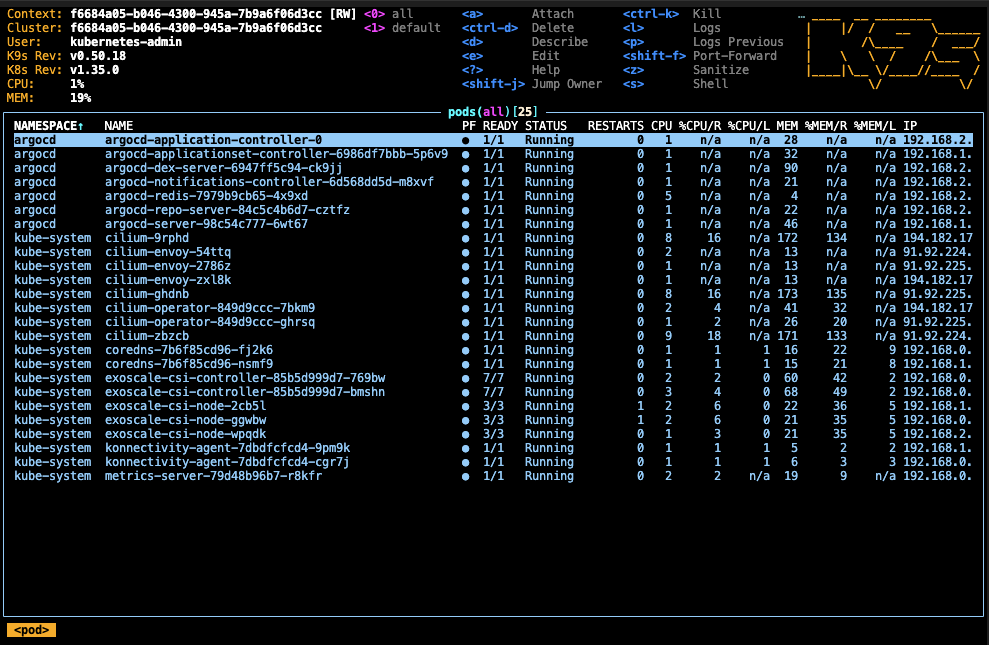
Resource Quotas
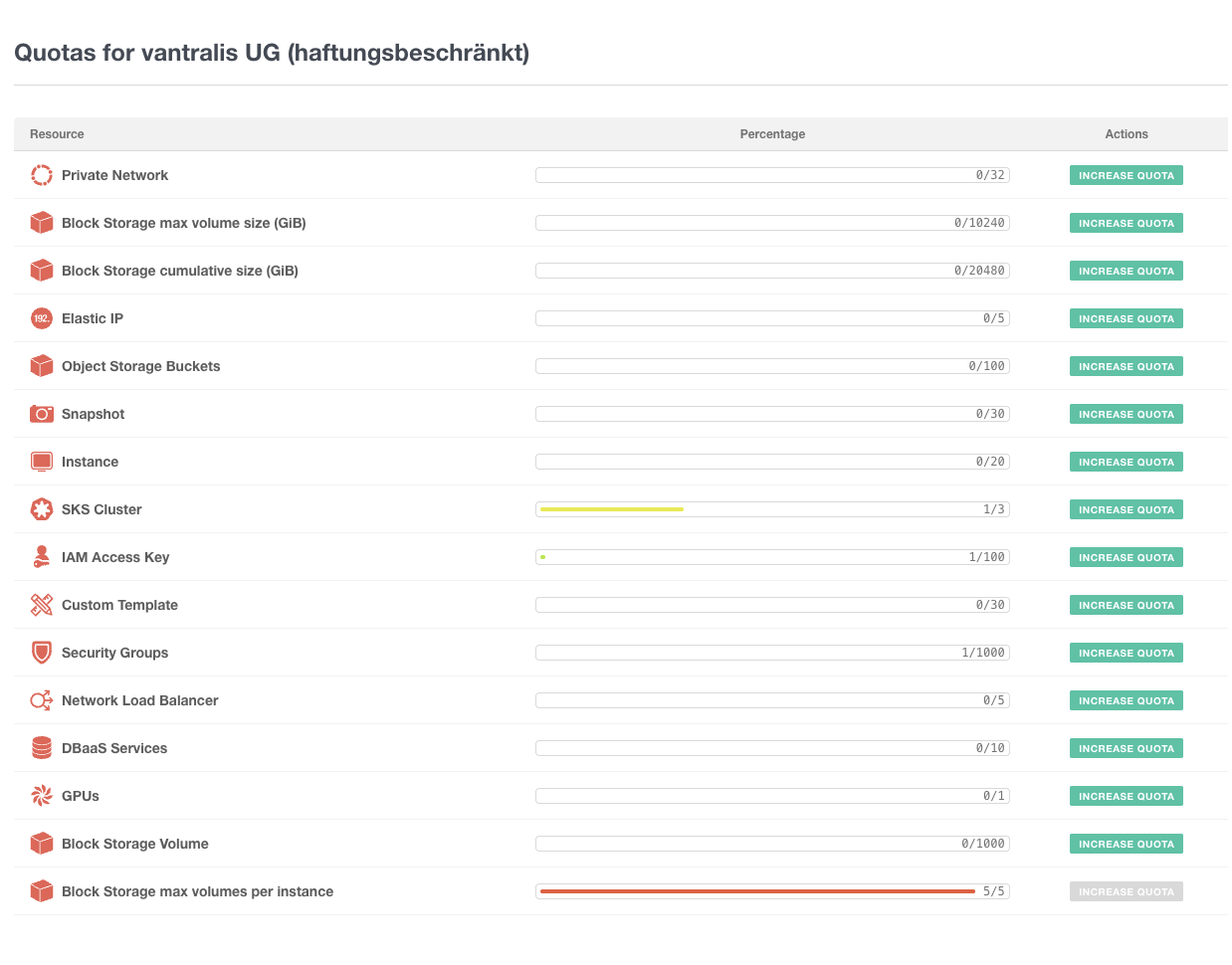
The Exoscale console gives you a clear view of all resource quotas. Worth checking before scaling up:
Exoscale vs OVHcloud vs Infomaniak
| Feature | Exoscale | OVHcloud | Infomaniak |
|---|---|---|---|
| Control plane cost | Free (Starter) / €30.44 (Pro) | Free | Free (Shared) / €25.95 (Dedicated) |
| CNI choice | Cilium, Calico, or none | Fixed (managed) | Fixed (Cilium) |
| Private cluster | No | Yes (vRack) | No |
| API IP restrictions | No | Yes | No |
| Anti-affinity groups | Yes | No | No |
| Short-lived kubeconfig | Yes (configurable TTL, CA rotation) | No (long-lived) | No (long-lived) |
| GPU instances | Yes (6 families) | Yes (limited) | No |
| Managed DBaaS | PostgreSQL, MySQL, Redis, Kafka, OpenSearch | PostgreSQL, MySQL, MongoDB, Redis, Kafka | MySQL only |
| Provider maturity | v0.68.x | v2.11.x (stable) | v1.x (stable) |
| EU zones | 8 (CH, DE, AT, BG, HR) | 10+ (FR, DE, PL, UK, CA) | 1 (CH) |
| Egress pricing | Tiered (generous free allowance, cross-zone free) | Free (EU/NA) | Included |
| Support speed | Fast (even on trial) | Standard | Not tested |
| Storage classes | 2 (no default) | 6 (with LUKS encryption) | 2 tiers (500-1000 IOPS) |
Who Is Exoscale SKS For?
Great fit for:
- Teams who want CNI flexibility (Cilium vs Calico)
- GPU/ML workloads on European infrastructure
- Projects that need managed databases alongside Kubernetes
- DACH-region deployments (Switzerland, Germany, Austria zones)
- Development and staging environments with fast provisioning
- Teams comfortable with OpenTofu/Terraform automation
Consider alternatives if:
- You need private clusters or API IP restrictions today (try OVHcloud — Exoscale’s VPC is under development)
- Compliance requires network isolation right now (Exoscale’s VPC and CIDR restrictions are on the 2026 roadmap)
- You want a self-hosted approach on cheaper VMs (see our Hetzner + Talos guide)
Pros & Cons
Fast provisioning
Cluster goes from zero to running in minutes. Fastest I've tested among EU providers.
CNI choice
Pick Cilium or Calico at creation time. Unique among European managed K8s offerings.
Anti-affinity groups
First-class HA feature spreading nodes across hypervisors. Free, no downside.
Excellent support
Fast, knowledgeable responses even on the free trial tier. Rare for European providers.
Rich DBaaS
Managed PostgreSQL, MySQL, Redis, Kafka, OpenSearch alongside your cluster.
GPU instances
Six GPU families available including RTX 6000 PRO and A5000.
Wide EU coverage
8 zones across Switzerland, Germany, Austria, Bulgaria, and Croatia.
Clean API and console
Developer-friendly, readable instance naming, well-organized UI.
Short-lived, scoped credentials
Configurable TTL kubeconfigs with per-user/group bindings and CA rotation for emergency revocation.
No private clusters (yet)
API endpoint is always public. No IP restrictions, no private endpoint. VPC is under development but no ETA. Worth evaluating for production workloads with compliance requirements.
No real private networking (yet)
Private networks are Layer 2 only. CNI runs over public interface. Security groups don't apply to private traffic. VPC will address this.
No managed RWX storage
Block storage is RWO only. AWS has EFS, Azure has Azure Files. Self-managed options like Longhorn exist but add operational overhead.
No default StorageClass
CSI creates two classes but neither is default. Manual patch required.
Verdict
Exoscale SKS has an excellent developer experience: fast provisioning, clean console, CNI choice, anti-affinity groups, GPU instances, great DBaaS offering, short-lived scoped credentials, and surprisingly responsive support even on a trial account. The security model at the node level is well-designed — self-referencing security groups, configurable credential TTLs with CA rotation, and an optional egress lockdown policy.
The one significant gap is the public API endpoint. The Kubernetes API is reachable from the internet with no option for IP restrictions or private endpoints. The compensating controls (short-lived certificates, RBAC, OIDC, audit logging) are real and meaningful, but they don’t replace network-level isolation. A leaked kubeconfig can be used from anywhere until it expires or the CA is rotated. For teams whose compliance requirements mandate a private API endpoint, OVHcloud addresses this today with vRack and IP restrictions.
Exoscale has confirmed that private API endpoints, CIDR restrictions, and private clusters are all on the roadmap, pending VPC — which is under active development. Once VPC lands, this becomes a top-tier EU Kubernetes offering. It’s already a strong choice for production workloads where a public API endpoint is acceptable with proper credential management.
Have you tried Exoscale SKS? I’d love to hear your experience. The full OpenTofu code is on GitHub. Find me at mixxor.
Pricing data: March 2026. Compare current Exoscale pricing | OVHcloud review | Infomaniak review | All provider comparisons
Edit (23 March 2026): Updated with corrections and additional context from Philippe Chepy at Exoscale.
Find the Best Kubernetes Pricing
Configure your exact cluster requirements and compare real-time prices across 25+ European providers.
Open Calculator