What HA Actually Costs: Kubernetes on netcup for €63/month with Talos and OpenTofu
netcup has no managed Kubernetes, no load balancer, no CSI and an API that cannot create servers. Here is how a three-control-plane Talos cluster still comes up in one tofu apply, and what the measurements say about firewall traps, IOPS, DNS failover and a control panel outage.
netcup sells a 2 vCPU / 4 GB / 128 GB NVMe VPS in Nuremberg for under €8 a month including VAT, billed hourly, no minimum term. Six of them make a Kubernetes cluster with three control planes, three workers, replicated storage and an ingress for about €47/month. Two more running haproxy bring it to €63/month. That buys the compute for a highly available cluster. Availability at the network edge is a separate purchase, and where that line runs is what this post is about.
How much of the €63 is actually highly available deserves precision, so I measured it. The control plane is: three etcd members, and a dead one costs nothing. The workers are: haproxy takes a dead one out of rotation in three seconds. The entry point is not: when a haproxy box itself dies, DNS round robin leaves CLI clients waiting out a 134-second timeout on Linux and failing outright on macOS. Closing that last gap needs a netcup failover IP or a proxy like Cloudflare in front, and neither is in the €63.
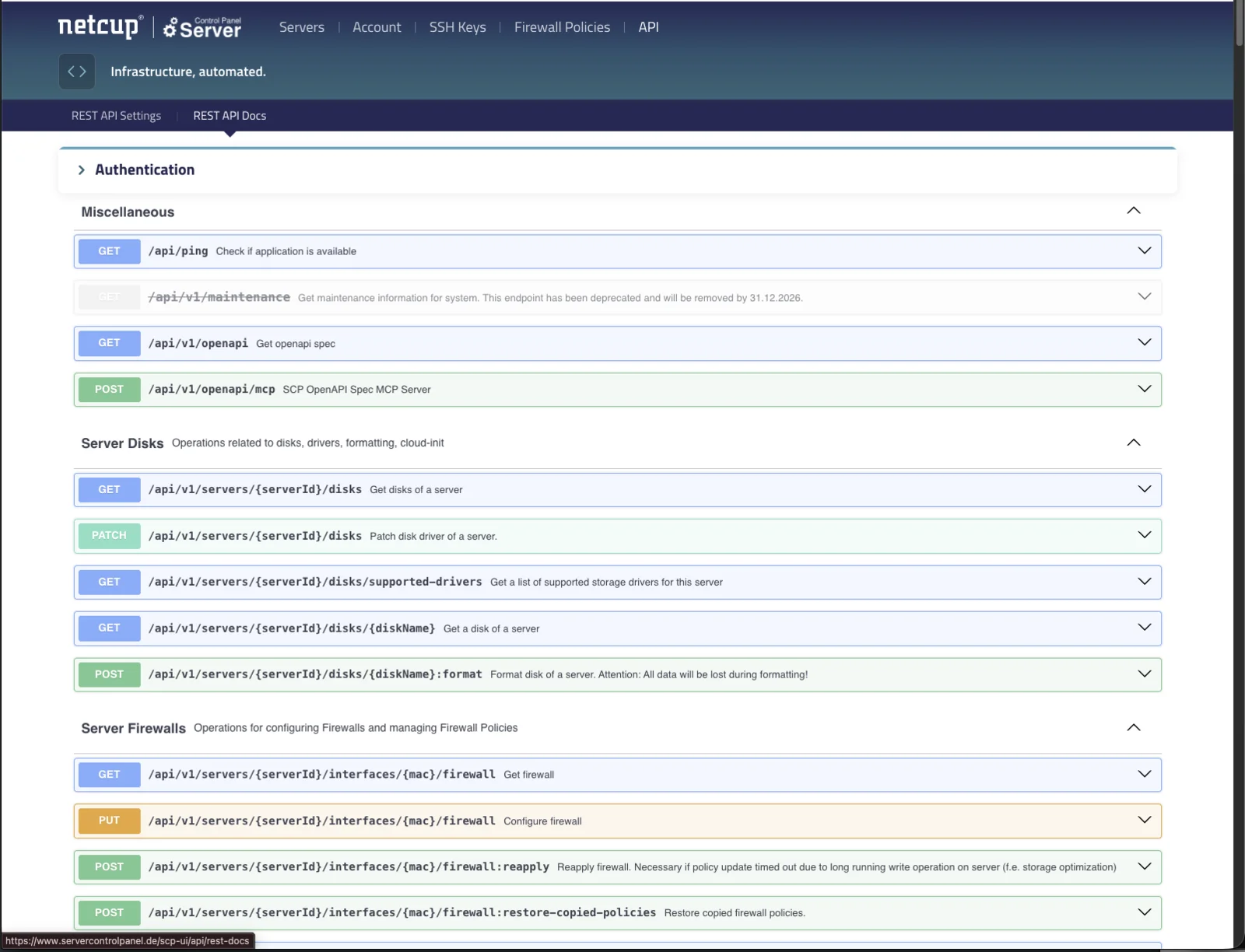
The catch is everything netcup does not have: no managed Kubernetes, no Service of type LoadBalancer, no CSI, no object storage, no cloud-init for foreign images, and an API that can neither create nor delete a server. What it has is a remote-controllable rescue system, a declarative hypervisor firewall, and a REST API with an OpenAPI spec and, oddly, its own MCP server.
I spent a week building a single-apply OpenTofu module on top of that: netcup-talos. Put in your server names, run tofu apply, get a verified cluster about five minutes later. This post is the high-level version of what I learned. Everything with a number in it was measured, and the build log with the dead ends is in the repo. The question was the same at every layer, control plane, ingress, DNS, storage, backups, the provider’s API, the firewall, upgrades: where does the availability actually stop?
What I Tested
- Servers: 6x VPS 500 G12 (2 vCPU @ 2.25 GHz, 4 GB DDR5 ECC, 128 GB NVMe, 2.5 Gbit/s NIC), Nuremberg. Three control planes and three workers for the storage, upgrade and hostname tests; for the load balancer tests one, later two, of the six were reinstalled as haproxy boxes, which takes about a minute on netcup
- OS: Talos Linux v1.14.0, installed via rescue system +
dd - Kubernetes: v1.37.0 (Talos 1.14’s default), Cilium 1.20.1 with WireGuard, Longhorn 1.12.1, Traefik as DaemonSet
- Load balancer: haproxy on VPS 500 G12 servers, installed through netcup’s own image installer
- Automation: OpenTofu with the community rixlhq/netcup provider plus the Talos and Helm providers
- Disclosure: links to netcup in this post are affiliate links, as they are on our netcup provider page and for several other providers on this site. The servers, the measurements and the opinions here are mine
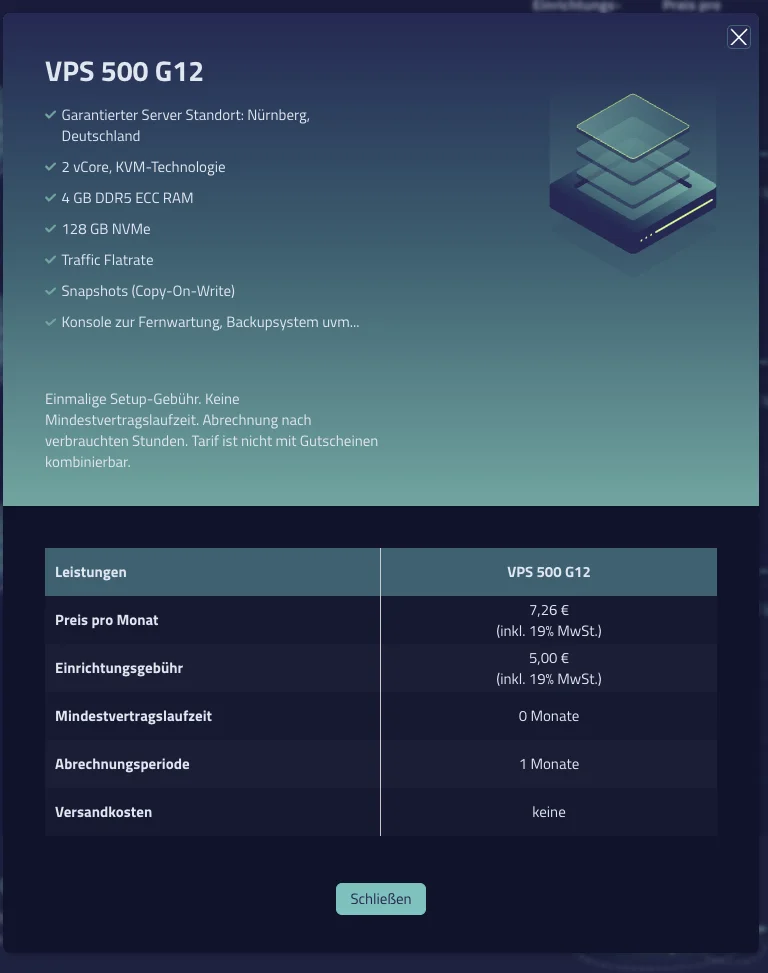
- Cost: three prices exist for the same server. The hourly tariff I booked bills €7.86 incl. VAT per month (€6.61 net); the order page quotes €7.26 incl. VAT plus a €5 setup fee; the monthly contract in our pricing data is €4.97 net. “€47” and “€63” in this post are the hourly tariff incl. VAT, the comparison table further down is net
The whole thing runs from one configuration. The minimum is a file with your server names:
clusters = {
  talos = {
    control_plane_servers = ["v2202...431", "v2202...432", "v2202...433"]
    worker_servers        = ["v2202...434", "v2202...435", "v2202...436"]
    loadbalancer_servers  = ["v2202...437", "v2202...438"]
    install_traefik       = true
    public_ingress_ports  = ["80", "443"]
  }
}
Two entries under clusters are two clusters in the same account. You do not need a domain; without one the API endpoint is the first control plane’s IP.
The Lifecycle Is Different
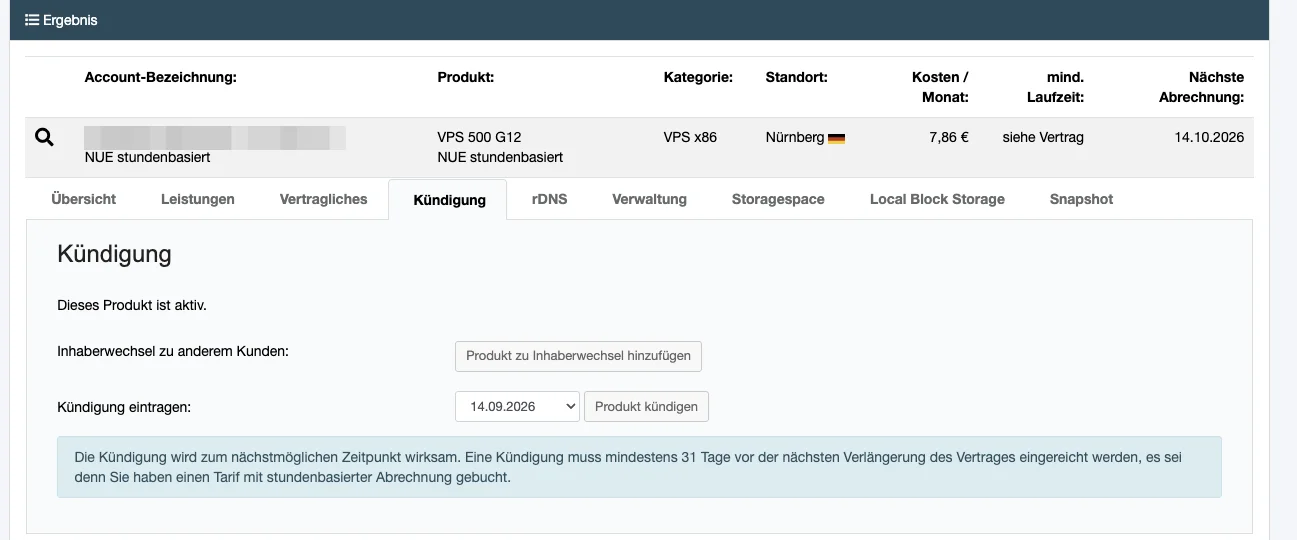
On Hetzner or Exoscale, tofu apply creates machines. On netcup it cannot. The netcup API has 63 endpoints and none of them orders or cancels a server. That stays in the customer panel. So the lifecycle is:
- Order the servers once in the panel (the confirmation mail has the
v2202...names) tofu applyas often as you like: firewall, OS onto the disk, Talos config, bootstrap, CNI, storage, ingresstofu destroyresets and powers off, but the servers keep costing money until you cancel them
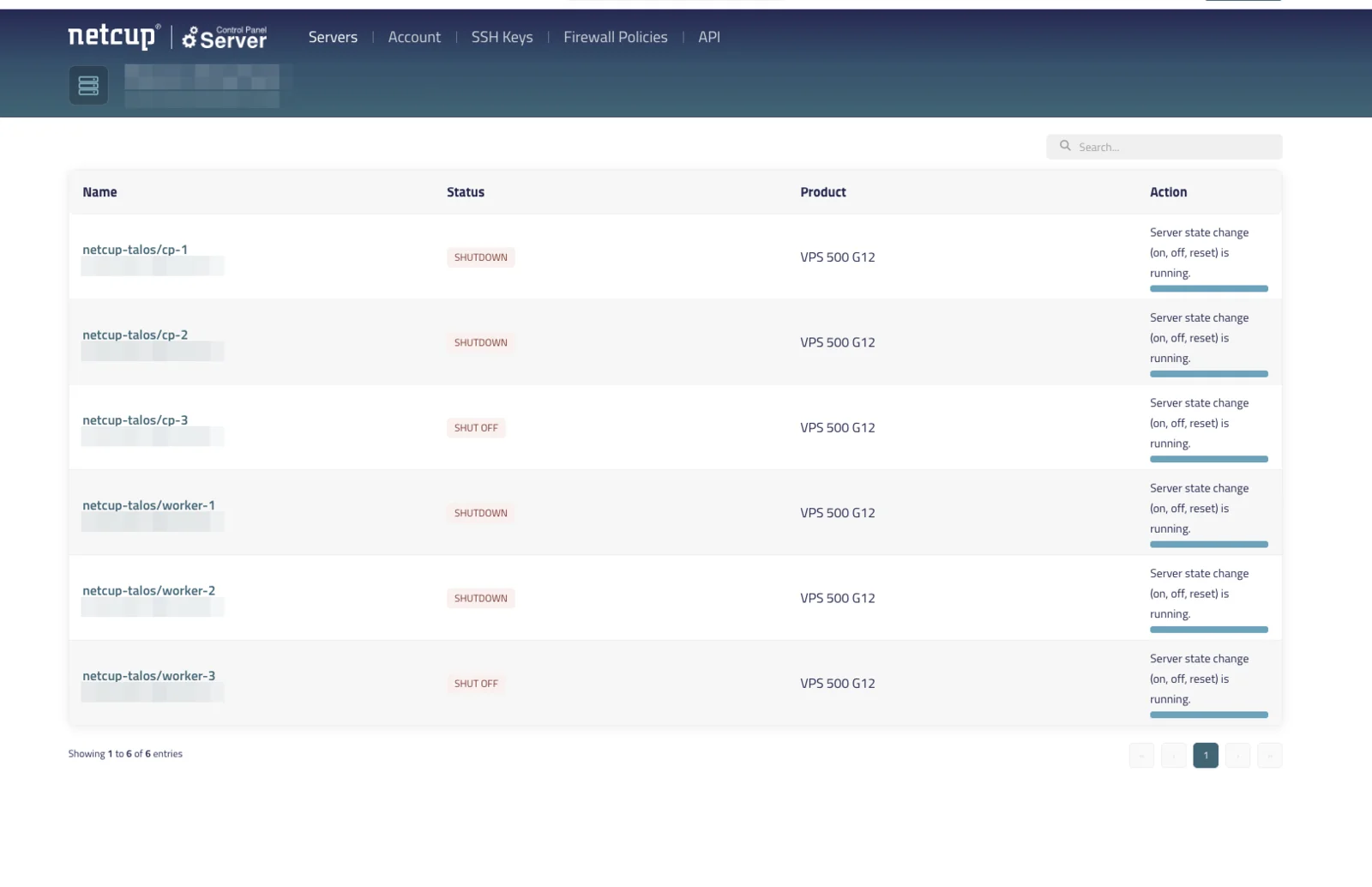
The module sets a nickname per server (<cluster>/cp-1), and refuses to install onto a server whose nickname belongs to another cluster. Two configurations would otherwise write an operating system onto the same disk.
The Good
The Rescue System Is Fully Scriptable
netcup’s image installer only takes netcup’s own images, so the module boots each server into the rescue system (a grml live image) and streams the Talos image from the Image Factory straight onto /dev/vda. The rescue root password comes from the API. No console, no email.
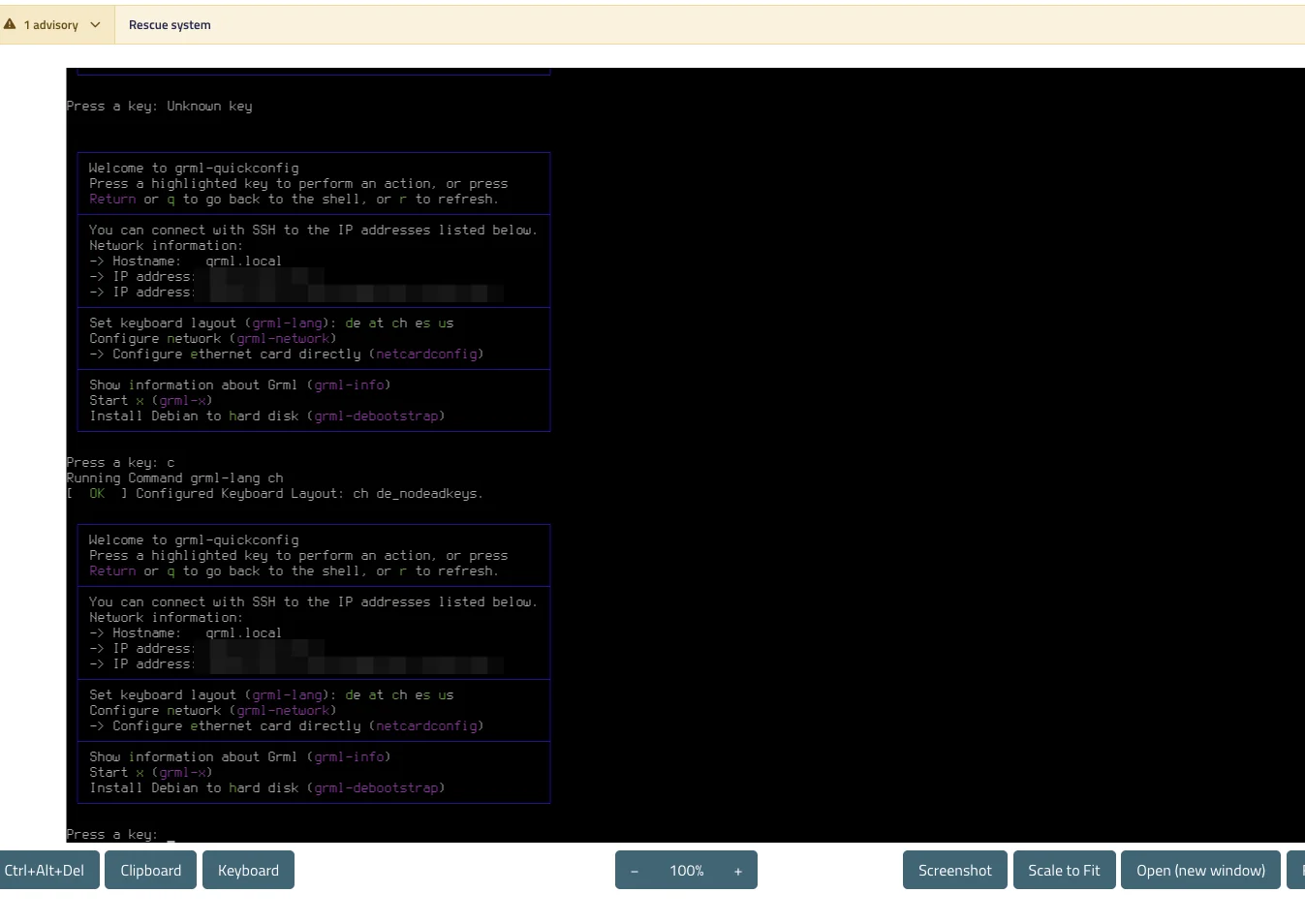
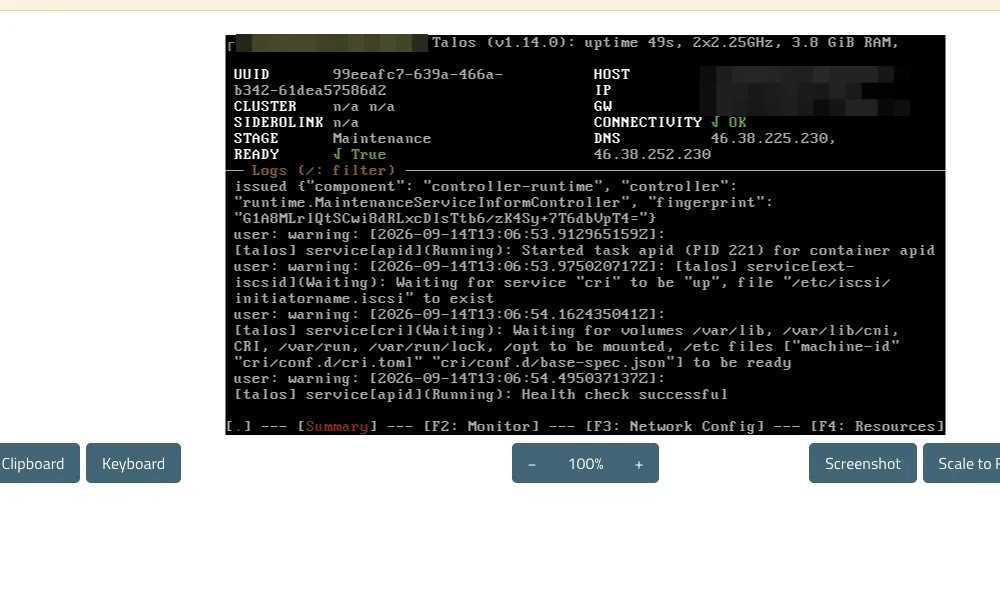
Talos then comes up in maintenance mode on port 50000, and from there it is a normal Talos bootstrap.
For the load balancers it is nicer still: netcup’s image installer takes SSH key IDs and a customScript, cloud-init light, and delivered a booted Debian 13 with haproxy installed in 58 seconds.
The Firewall Is Real and Declarative
Firewall policies live on the hypervisor, independent of the guest OS. The module writes them before the install, so during the rescue window port 22 is open to your admin IP only, not root SSH with password auth to the whole internet.
Storage That Actually Performs
netcup ships no CSI driver. Longhorn on the local NVMe, replicated over Cilium’s WireGuard, fills the gap, and it is not slow: at queue depth 1 the three-way replicated volume delivered about 1,700 IOPS, more than three times what Infomaniak’s managed block storage measured. The bare NVMe underneath did 22,700 IOPS, a number that only compares to other local disks and is here to show what replication costs.
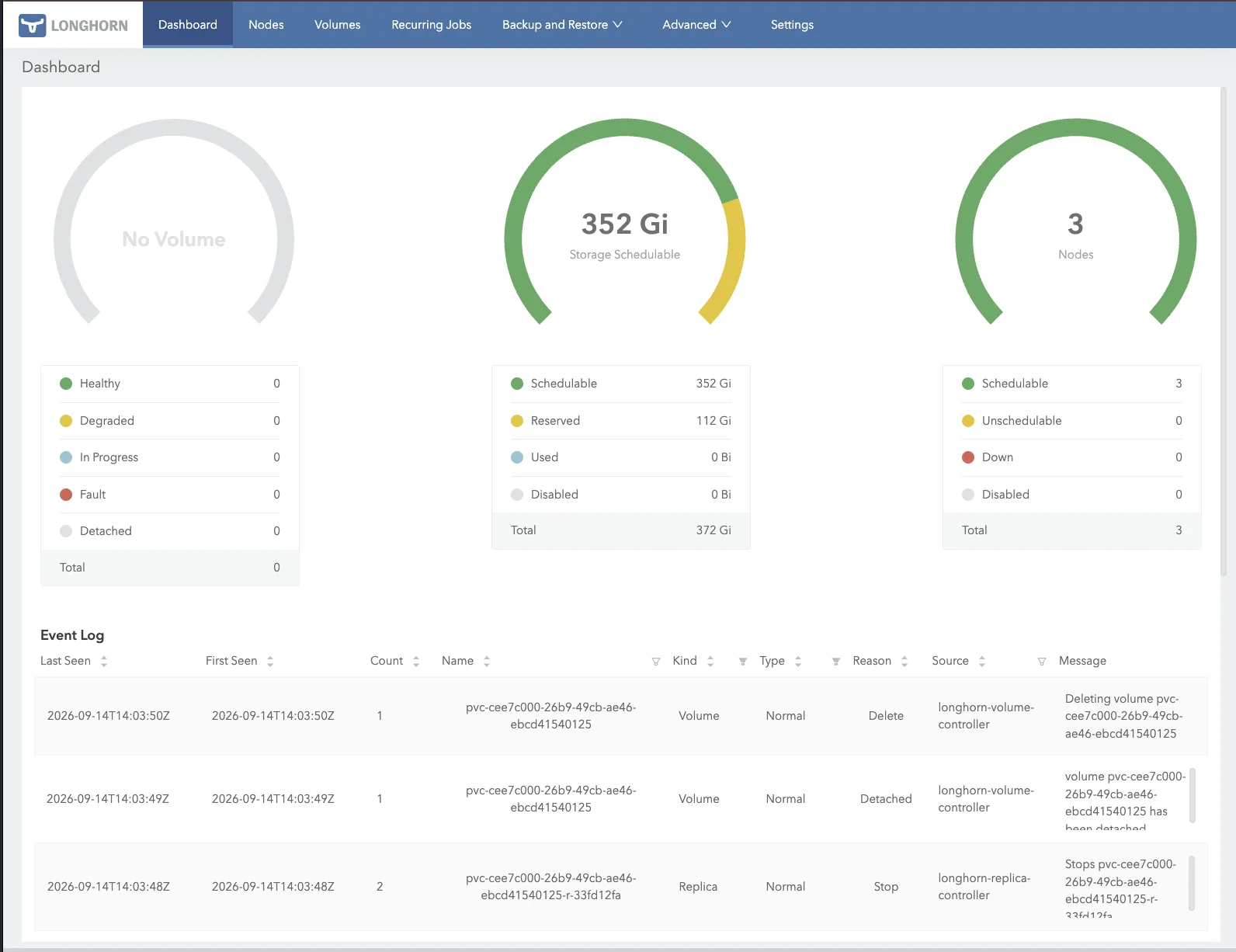
The replication traffic runs over the public interface on purpose. netcup’s Cloud vLAN is 100 Mbit/s free or 1 Gbit/s for €12.99, while the public NIC on the same server does 2.5 Gbit/s, so a private network would have been a bandwidth downgrade for Longhorn. Confidentiality comes from Cilium’s WireGuard, segmentation from the firewall.
Upgrades Are Boring
Every Kubernetes image is pinned in the Talos machine config, so a Kubernetes upgrade is tofu apply -var kubernetes_version=v1.37.0. Measured from v1.36.4 across six nodes: the apply took 4 seconds, all kubelets were on the new version after 8, all three kube-apiserver pods after about a minute, and in that minute the API failed 2 of 51 half-second probes, roughly one second out. The rollout is the minute, not the four seconds. Talos itself upgrades node by node with talosctl; the repo’s script keeps the schematic, and with it iscsi-tools, without which Longhorn dies.
The Cluster Does Not Depend on netcup’s Control Panel
On September 16 the Server Control Panel went into scheduled maintenance: HTTP 503 from API and web UI for at least three hours. No tofu plan, no firewall edit, no reboot via API.
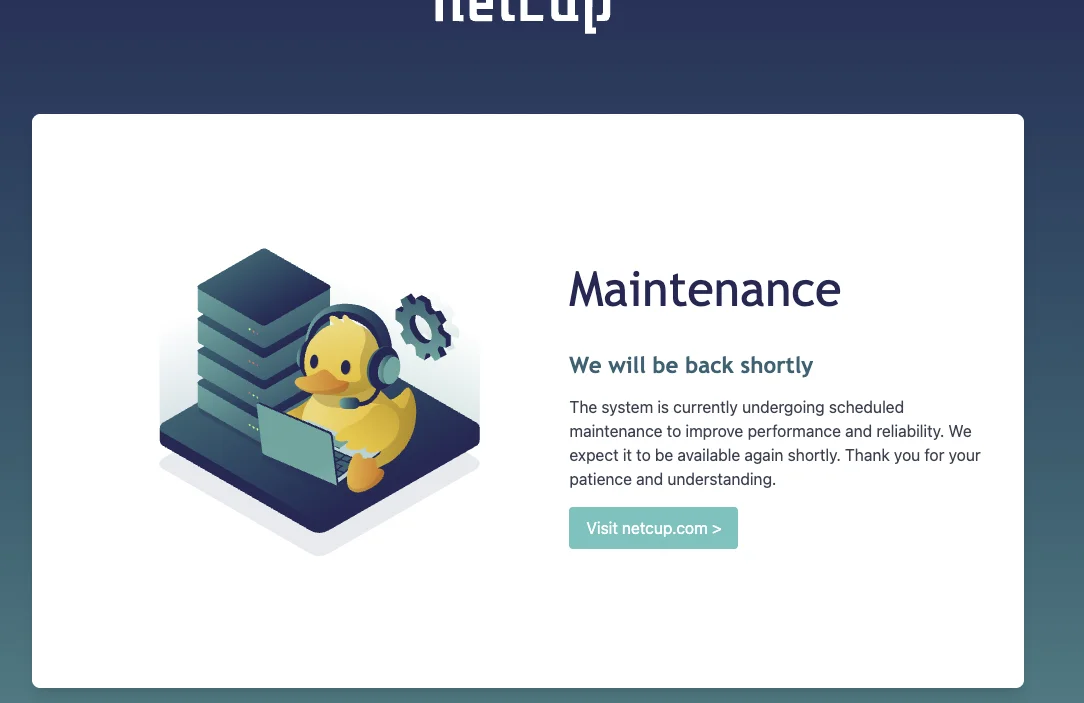
The cluster did not notice. All nodes stayed Ready, the ingress kept answering, talosctl and kubectl talk to the nodes directly. The upside of a platform that does so little: there is less of it to fail.
The Not-So-Good
No Load Balancer, and No Way to Fake One in the Cluster
A Service of type LoadBalancer stays pending forever. The obvious answer, MetalLB, does not apply: six individually ordered VPS share no Layer 2 for their public IPs, and there is no BGP peer. Cilium L2 announcements and kube-vip fail at the same point. This is a platform property, not a software gap.
What works, in order of effort:
- DNS round robin. Traefik runs as a DaemonSet on hostPort 80/443, one A record per worker. Free, but DNS has no health checks.
- Two haproxy servers in front. The repo’s
ha_proxy-netcup-k8smodule. Cluster ports then close to everything except the load balancers. Measured with Traefik removed from one worker mid-test: detection in 3 seconds, 10 of 10 requests fine. - A proxy like Cloudflare or a netcup failover IP if the entry point must survive a dead box regardless of the client’s resolver.
Two DNS names do two jobs here. The Kubernetes API gets one A record per control plane and no load balancer: kubectl and everything built on client-go try the next address when one does not answer. That holds on Linux and inside the cluster; on macOS, where the resolver may hand over only one address (measured below), it is a convenience rather than a guarantee, and I did not test kubectl from a Mac against a dead control plane. The application wildcard points at the haproxy boxes, or without them at the workers.

DNS Failover Is Worth Less Than the Advice Suggests
I measured it, against the application name with two A records, one per haproxy box. A netcup port with no listener does not refuse the connection, it drops the packets, so a client that picks the dead address first waits out its full TCP connect timeout: 134 seconds on Linux. Worse, macOS getaddrinfo handed over only one of the two A records. With no fallback, twenty of twenty requests failed, and a Mac is exactly where kubectl usually runs.
The Firewall Is Not Stateful for UDP
One user policy flips both implicit rules to DROP_ALL, ingress and egress, silently. And it is stateful for TCP but not for UDP. Four missing rules cost me a rebuild each, and none of the errors looked like a firewall:
| Missing rule | What you see instead |
|---|---|
| UDP source port 123 (NTP replies) | Node hangs forever in STAGE: Booting, TLS certs fail, log says NTS query retry ... i/o timeout |
| UDP destination port 68 (DHCP) | Node loses its IPv4 address on the next boot, console shows an empty IP field |
| TCP 50001 between nodes (trustd) | apid never starts on workers, talosctl gets connection refused |
| TCP 22 from admin IP | The install cannot reach the rescue system |
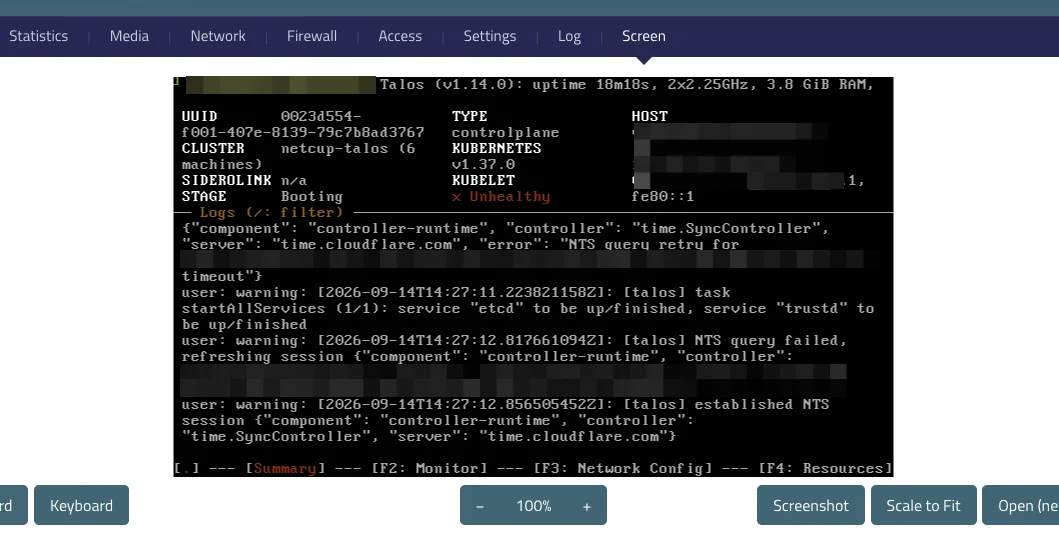
The NTP one is the nasty one: it does not show up before the first hard cutover, because the nodes synced their clocks long before the policy was applied.
One honest caveat about the fix. Because the firewall is stateless for UDP, the module allows inbound UDP with source port 123 from anywhere. That is a hole anyone can walk through with a spoofed source port. The right rule restricts it to the addresses of your NTP servers, and the module does not do that yet. It is on the list.
Talos Node Names Are Not Deterministic Out of the Box
Not a netcup problem, but it cost me a cluster. Talos 1.14 defaults to auto: stable for the hostname: if DHCP delivers one in time the node is v2202609377682520432, if it arrives late, say after the power cycle that netcup’s storage optimization triggers, the node calls itself talos-wjb-3z0. The kubelet registers under whatever name it has at start.
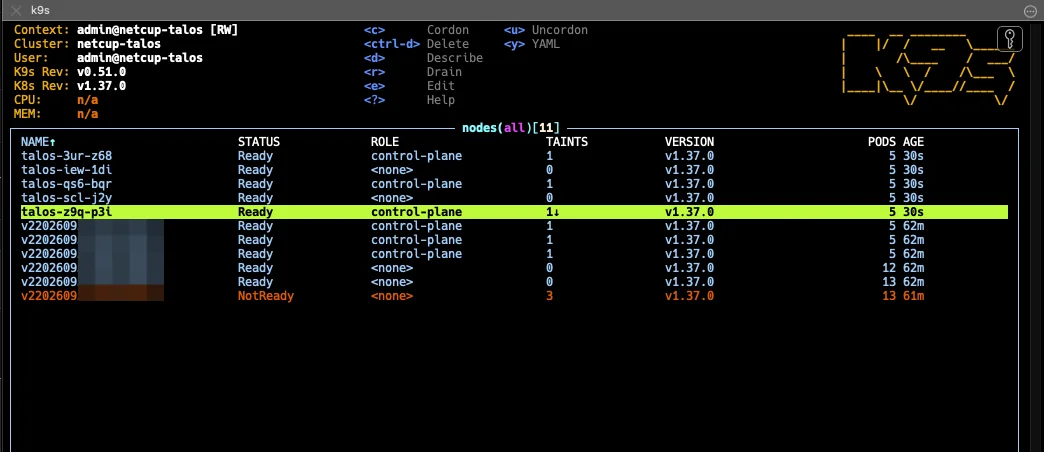
A six-node cluster ends up with twelve node objects, six of them NotReady corpses (the screenshot caught it at eleven) and a Longhorn pointing at nodes that no longer exist. The fix is auto: "off" with a static hostname, quoted, because unquoted off is a YAML boolean; every other combination fails validation. Tracked in siderolabs/talos#12573.
Two Bugs in the Terraform Provider
Both small, both on the critical path, both filed with fix PRs:
- Bodyless writes lack
Content-Type(#24, fix in #26). netcup rejectsPOST /rescuesystemwithout the header, so until merged the rescue toggles stay in a shell script. - Firewall
sourcesis a list, the API treats it as a set (#25, fix in #27). Any rule with more than one source never converges. Workaround: one rule per source, which turns 20 rules into 60.
Smaller Papercuts
- HTTP 409 after every power task. The server reports
SHUTOFFbefore it is writable again; the API client has to retry onserver.lock.error. - Storage optimization powers servers off and deletes all snapshots, and neither is documented. Repeated reinstalls bloat the thin-provisioned disk: 91 GiB across six nodes went back to 33 GiB after optimization.
- The refresh token dies after 30 days of non-use. Clone the repo two months later and you re-authenticate.
Benchmarks
fio random 4K read/write, iodepth=1, numjobs=4, 60 s, both runs on the same worker:
| netcup Longhorn (3 replicas, WireGuard) | netcup local NVMe | |
|---|---|---|
| Random 4K read / write IOPS | 1,708 / 1,713 | 22,700 / 22,700 |
| Read / write bandwidth | 6.8 / 6.9 MiB/s | 88.5 / 88.6 MiB/s |
| stress-ng, 4 CPU hogs | n/a | 2,907 bogo ops/s |
For scale, and not as a ranking because the parameters differ: Infomaniak’s managed block storage measured ~500 IOPS, Exoscale’s ~3,800 to 4,000 at iodepth=32. The Longhorn column is the one to hold against those, since it is replicated network storage too, and queue depth 1 is the harder test.
A second run two days later on a rebuilt cluster came in 22% lower on Longhorn (1,337 IOPS) and 8% lower on local NVMe (20,900). Shared vServers, no guaranteed IOPS: the orders of magnitude hold, the decimals measure your neighbours. The factor of 13 to 16 between the two columns is the price of three-way replication over WireGuard on 2 vCPUs; the local-path StorageClass skips it and the data dies with the node.
Memory: about 1.1 GB base load per node with Cilium and Longhorn, so roughly 2.8 GB left for workloads on a 4 GB VPS. It fits, as long as Longhorn does not also run on the control planes.
The Setup: One Apply, No Cluster Connection at Plan Time
The trick that makes a single tofu apply possible: the Helm provider only renders charts locally with data "helm_template", and Talos applies the result at bootstrap through cluster.inlineManifests. No provider needs a cluster connection at plan time, so there is no two-phase apply.
The trade-off is that inline manifests are applied once, never reconciled. Removing one does not remove it from the cluster. The gitops preset therefore keeps only Cilium, Longhorn and ArgoCD inline and lets ArgoCD deliver the rest; the two Talos specifics that cost time there, a privileged namespace for Traefik’s hostPorts and ArgoCD’s redis secret that a Helm hook would normally create, are documented in the repo.
Day two is scripts, not magic: verify.sh runs 18 health checks that print real output, backup-etcd.sh pulls a snapshot through the Talos API and checks it is a valid bbolt file, and tests/backup-restore.sh proves the Longhorn backup path by destroying a volume and its replicas before restoring. Three replicas are not a backup.
Where the backups go is your problem, because netcup has no object storage. The etcd script writes locally and uploads to any S3 bucket you name; the Longhorn target is a module variable that takes any S3 endpoint. The restore test uses a throwaway SeaweedFS inside the cluster, a test rig that shares the failure domain it should protect against. For the real thing, point both at a bucket at a different provider.
Same for the OpenTofu state, and this one I would fix before running anything real: it is local and holds the cluster CA’s private key, kubeconfig and talosconfig in plain text. The module does not turn on OpenTofu’s native state encryption; add it in your own root first, with a remote S3 backend at a provider that has one.
netcup vs Hetzner vs the Managed Options
This is a cost-shape comparison, not a feature-for-feature one: the same server count and class in every column, but different operating models behind them.
| netcup + Talos | Hetzner + Talos | OVHcloud MKS | Exoscale SKS | |
|---|---|---|---|---|
| Managed control plane | No | No | Yes (free tier) | Yes (free Starter) |
| Server create/delete via API | No | Yes | Yes | Yes |
type: LoadBalancer | No (haproxy module) | Yes (hcloud LB) | Yes | Yes |
| CSI / block storage | No (Longhorn) | Yes | Yes | Yes |
| Object storage for state/backups | No | Yes | Yes | Yes |
| Storage IOPS (random 4K) | ~1,700 Longhorn / ~22,000 local (qd1) | not measured | not benchmarked | ~3,800 to 4,000 (qd32) |
| Time to cluster | ~5 min | ~5 min | minutes | < 2 min |
| Control plane, HA | 3× VPS 500 G12, self-run: €19.82 | 3× CX23, self-run: €21.39 | Free tier: shared, single AZ, not HA | Starter: free, no SLA; Pro: €40.15 |
| Workers, 3× 2 vCPU / 4 GB | 3× VPS 500 G12: €19.82 | 3× CX23: €21.39 | 3× D2-4: €45.12 | 3× Medium: €102.18 |
| Entry point | 2× VPS 500 G12 with haproxy: €13.21 | Load balancer: €8.91 | Load balancer: €6.94 | Load balancer: €25.35 |
| Total, same shape, net | €52.84 (hourly tariff) | €51.69 | €52.06 | €127.53 (Starter) / €167.68 (Pro) |
| Same on netcup’s monthly contract | €39.76 | |||
| Egress | Flat rate | 20 TB included | included | metered |
Same shape in every column: a three-node control plane where the provider lets you have one, three workers of the 2 vCPU / 4 GB class, and something in front of the ingress. All figures net. netcup is my hourly tariff as billed, divided by 1.19; Hetzner, OVHcloud and Exoscale are list prices from our pricing data, which I did not re-verify against the providers’ pages for this post. On the hourly tariff netcup and Hetzner are a coin flip; on netcup’s monthly contract netcup is the cheapest column by a quarter. And the managed columns get their control plane for free only in the tier that is not highly available: OVHcloud’s free tier is single-AZ with a 99.5% SLA, Exoscale’s Starter tier has no SLA at all. netcup and Hetzner give you three real etcd members because you run them yourself, and that is what the six servers are for.
Sizing: Bigger Workers, Same Small Control Plane
The control plane does not need to grow with the workload. Talos with Cilium and Longhorn idles at about 1.1 GB per node, and the module keeps workloads off the control planes, so three VPS 500 G12 stay the right size for etcd whatever the workers look like. The same goes for the two haproxy boxes. That fixes the overhead at five small servers, and the cluster scales by picking a worker tier.
Net monthly-contract list prices from our pricing data, three workers each, plus the fixed 3× VPS 500 G12 control plane and 2× VPS 500 G12 haproxy (€24.85). The Hetzner column is the same shape with 3× CX23 control planes and a Hetzner load balancer (€30.30 fixed):
| Worker tier | Per worker | netcup total | Hetzner, same class |
|---|---|---|---|
| 3× VPS 500 G12, 2 vCPU / 4 GB / 128 GB | €4.97 | €39.76 | 3× CX23 (2 / 4 / 40 GB): €51.69 |
| 3× VPS 1000 G12, 4 vCPU / 8 GB / 256 GB | €8.71 | €50.98 | 3× CX33 (4 / 8 / 80 GB): €62.40 |
| 3× VPS 2000 G12, 8 vCPU / 16 GB / 512 GB | €16.18 | €73.39 | 3× CX43 (8 / 16 / 160 GB): €89.16 |
| 3× VPS 4000 G12, 12 vCPU / 32 GB / 1 TB | €27.24 | €106.57 | 3× CX53 (16 / 32 / 320 GB): €137.37 |
Two things to read out of that. netcup tiers ship three to four times the NVMe of the Hetzner class, and with Longhorn on the workers’ local disks that is schedulable storage: three VPS 2000 G12 give it about 1.5 TB raw, 500 GB usable at three replicas. And the hourly tariff I ran on costs about a third more than these monthly-contract figures (€6.61 against €4.97 net), the price of being able to throw the servers away.
Who Is netcup For?
Great fit for: EU-hosted Kubernetes with a real three-member control plane at Hetzner prices, or below them on a monthly contract, for people willing to own the missing pieces; compute-heavy clusters where the platform does not need to think; German data residency on a budget; Talos users who want a second, cheaper provider.
Consider alternatives if: you expect type: LoadBalancer, dynamic volumes via CSI, remote state at the same provider, or infrastructure that can be created and destroyed from Terraform. Those gaps are the product boundary, not an oversight.
Pros & Cons
Price
Six nodes with three control planes for ~€47/month incl. VAT, eight with two haproxy boxes for ~€63, hourly billing, no minimum term, flat-rate traffic.
One apply
From empty disks to a verified cluster in about five minutes. Reinstall as often as you like.
Scriptable rescue system and image installer
Password from the API, no console. netcup images install with SSH keys and a post-install script in under a minute.
Fast storage
Local NVMe at ~22,000 IOPS at queue depth 1; even three-way replicated Longhorn beats Infomaniak's managed storage by 3x.
Declarative hypervisor firewall
Granular, applied before the OS exists, and it works.
Control panel outages don't touch the cluster
Three hours of HTTP 503 on the API; every node stayed Ready.
No server create or delete via API
Order and cancel in the panel. tofu destroy does not stop the bill.
No load balancer, no CSI, no object storage
You build the ingress entry point yourself, and remote state has to live elsewhere.
Firewall traps
Not stateful for UDP; missing NTP or DHCP rules leave nodes stuck in boot with errors that don't look like a firewall.
Local state with private keys
No locking, no team workflow, and a lost state file rebuilds rather than adopts.
Undocumented side effects
Storage optimization powers servers off and deletes every snapshot. The API keeps a lock after each power task and answers 409 while the state already reads SHUTOFF.
The control panel is a hard dependency for changes
Every plan starts with a call to the SCP API. During its maintenance window, three hours of HTTP 503 in this case, nothing can be planned or applied.
Verdict
netcup is cheap and honest, and it is missing exactly the things the hyperscaler story starts with. What it has instead, a scriptable rescue system, a firewall that means it and a fast public NIC, is enough for a cluster in a single tofu apply. The part other providers ship, you build, and the repo is that part.
Availability on this platform is bought layer by layer. Three small servers buy an etcd quorum. Replicas buy surviving a dead worker’s disk. Two haproxy boxes buy surviving a dead worker at the ingress. Surviving a dead haproxy box needs a failover IP or a proxy in front, and neither is in the €63. That sum, not the headline, is what HA actually costs here, and every one of those layers was measured rather than assumed.
The most honest sentence I can write about it: the cluster did not notice netcup’s three-hour maintenance window. The API steers the servers, it does not run them, and that is exactly why this works.
The full OpenTofu code (modules, presets for a minimal, a complete and a GitOps cluster, two clusters side by side, and the day-two scripts) is on GitHub. Find me at mixxor.
Benchmark data: September 2026. Hetzner + Talos | Exoscale review | OVHcloud review | Infomaniak review | All provider comparisons
netcup Vouchers
Partner vouchers from our netcup affiliate account. New customers only, one voucher per order. Plan vouchers come with a 12-month contract billed yearly and are single-use: a code is used up as soon as it goes into the netcup cart, so add it when you are ready to order. If one has already been taken, get another code.
| Plan | Specs | Monthly plan | Voucher | Code |
|---|---|---|---|---|
| VPS 1000 G12.5 | 4 vCPU · 8 GB | €14.02 | 1st month free12-month term | •••••••••••••••• |
| RS 1000 G12.5 | 4 vCPU · 8 GB | €21.01 | 2 months free12-month term | •••••••••••••••• |
| VPS 2000 G12.5 | 8 vCPU · 16 GB | €26.02 | 1st month free12-month term | •••••••••••••••• |
| RS 2000 G12.5 | 8 vCPU · 16 GB | €39.34 | 1st month free12-month term | •••••••••••••••• |
| VPS 4000 G12.5 | 12 vCPU · 32 GB | €43.83 | 1st month free12-month term | •••••••••••••••• |
| VPS 8000 G12.5 | 16 vCPU · 64 GB | €64.84 | 1st month free12-month term | •••••••••••••••• |
| RS 8000 G12.5 | 16 vCPU · 64 GB | €143.44 | 1st month free12-month term | •••••••••••••••• |
36nc17837988700Find the Best Kubernetes Pricing
Configure your exact cluster requirements and compare real-time prices across 25+ European providers.
Open Calculator